
Ever had that lightbulb moment where you realize your traditional thermostat is silently draining your energy and wallet? I sure did one chilly winter evening when I looked at my utility bill and wondered, “Is there a smarter way?” That realization led me down the rabbit hole of wiring and programming smart thermostats — and let me tell you, it’s not as complicated as it sounds, especially if you’re willing to roll up your sleeves.
Why Tackle Smart Thermostat DIY Projects Now?
In a time when energy costs are climbing and climate awareness is at an all-time high, optimizing your home’s heating and cooling isn’t just about saving money — it’s about making a difference. Smart thermostats can cut your energy bills significantly, often by 10-15%, according to the Department of Energy. Plus, they offer comfort and convenience, learning your schedule and adjusting automatically. But the real magic happens when you wire and program these devices yourself, turning a simple DIY project into a long-term energy saver.
What’s the Big Deal About DIY Wiring & Programming?
Initially, I thought, “This sounds complicated, maybe I should just hire a pro.” But I made a common mistake early on — rushing into installation without fully understanding my existing wiring. That led to a few frustrating hours troubleshooting, and I almost gave up. Now, I know that taking the time to learn the basics, like how your current system is wired, makes all the difference. If you’re wondering whether you can do this, the answer is a resounding yes — with patience and a bit of guidance. For a comprehensive overview, check out my detailed step-by-step guide on building step-by-step DIY guides.
Getting Ready to Bring Smart Control Home
In the next sections, I’ll walk you through the wiring basics, choosing the right thermostat, and programming it to maximize energy savings. Whether you’re a seasoned DIYer or just starting out, this guide will help you avoid common pitfalls and set you up for success. Ready to make your home smarter, more energy-efficient, and tailored to your lifestyle? Let’s dive into the details that will turn you from DIY novice to thermostat pro!
Identify Your Existing Wiring Setup
Start by turning off power to your HVAC system at the breaker box. Remove your current thermostat cover and take a clear photo or note down the wiring connections. Typically, you’ll see wires labeled with letters like R, W, Y, G, and C. My first attempt involved a bit of trial and error, as I initially misidentified the common wire, leading to some confusion. Once I correctly identified the wires, I was able to proceed smoothly.
Prepare Your New Smart Thermostat
Choose a compatible smart thermostat like the Nest or Ecobee. Read the manufacturer’s wiring instructions thoroughly. Gather necessary tools such as a screwdriver, wire strippers, and a voltage tester. Remember, matching your wires with the thermostat’s terminal labels is crucial for proper operation. I learned this the hard way when my first connection caused the display not to power up; double-checking wire colors against the terminal diagram saved me hours of troubleshooting.
Wire the Thermostat
Turn the power back on briefly and verify the presence of voltage with a tester. Then, turn off power again before wiring. Connect each wire to its corresponding terminal: R (power), W (heat), Y (cooling), G (fan), and C (common). Use wire nuts to secure connections, and ensure no exposed wire is left. I recommend labeling wires if they’re not color-coded. During my installation, I mistakenly swapped W and Y wires, which caused my system to run in cooling mode when I intended heating — learning from this, I always double-check connections before powering up.
Configure Programming Settings
Power on the thermostat and follow the setup prompts. Connect it to your Wi-Fi network, then download the corresponding app. Set your preferred schedule, temperature preferences, and geofencing options if available. I found that customizing the schedule to match my work hours significantly reduced unnecessary heating. Spend time exploring the app’s features; some thermostats allow learning your habits over time, further optimizing energy savings. Remember, proper configuration is key—missteps here can negate the savings from wiring correctly.
Test and Fine-Tune
Test the system by manually adjusting the temperature and ensuring heating or cooling responds appropriately. Observe system behavior over a couple of days, and tweak settings as needed. I once set my schedule incorrectly, causing the system to run when I was away; updating it saved me a lot on energy bills. Regularly check the app for system alerts or updates that can improve performance. With patience, your DIY wiring and programming will turn your home into an energy-efficient smart space, all without calling in a professional.
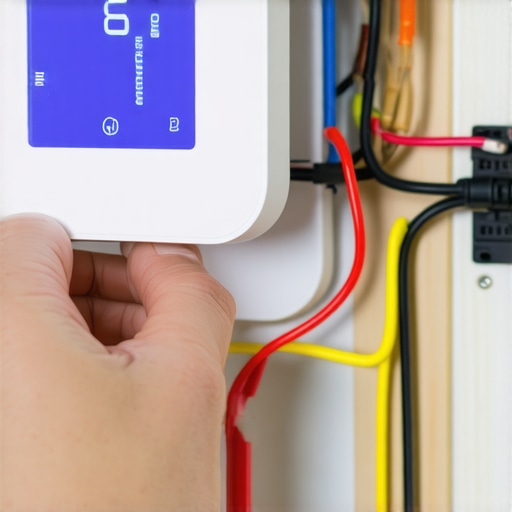
Many DIY enthusiasts fall prey to misconceptions when it comes to wiring and programming smart thermostats, leading to frustration or even system damage. Let’s clarify some of the most pervasive myths and share insights to help you avoid costly mistakes.
Are All Wires Necessary for a Smart Thermostat?
Contrary to popular belief, not every wire in your existing setup is essential for a smart thermostat to function properly. Modern models often support simplified wiring or wireless sensors that can bypass traditional wiring challenges. For example, if your system lacks a C (common) wire, some thermostats can operate with power-sharing technology or require a DIY guide to adapter installation. Relying solely on the assumption that all wires must be transferred can lead you to unnecessary complications.
Programming a Smart Thermostat Is Only for Tech-Savvy People
This is a myth. While advanced features exist, most smart thermostats are designed with user-friendly interfaces. The key is understanding your HVAC system and customizing the schedule based on your routine. Spending a little time reading the manual or exploring online tutorials can save you from common pitfalls. Remember, the goal is energy savings and comfort, not mastering complex code.
Beware the Overconfidence in DIY Wiring
One of the most common oops moments is assuming that wiring is straightforward because of the simplified diagrams. However, every HVAC system is unique. A minor mistake, like swapping W and Y wires, can cause your system to run in the wrong mode or not respond at all. Always turn off power before wiring, double-check connections, and use a voltmeter to verify. If you’re unsure, consulting a professional or following a reputable DIY project guide can prevent costly errors.
How Can Advanced Wiring Techniques Improve Your System
For seasoned DIYers, exploring techniques such as installing dedicated circuits or upgrading to a new C wire can significantly enhance reliability and energy efficiency. Properly wired systems ensure consistent power supply, reducing system errors or downtime. For intricate projects, consider consulting expert resources or comprehensive tutorials available on the site. Remember, a well-wired thermostat isn’t just about convenience — it’s about long-term savings and durability.
Have you ever fallen into this trap? Let me know in the comments.
Equip Yourself with the Right Tools for Long-Term Success
Maintaining your DIY smart thermostat setup isn’t just about initial wiring and programming; it’s equally about using the right tools to ensure longevity and reliability. I personally swear by a few key items that make ongoing maintenance straightforward and effective. A high-quality digital multimeter is essential — I use the Fluke 115 True RMS Multimeter because of its precision and durability. It helps me verify voltage and troubleshoot wiring issues without guesswork. Additionally, a fine-tipped soldering iron like the Weller WES51 has been invaluable for fixing minor circuit board issues or making custom modifications over time.
For software updates and system monitoring, I rely on the official apps provided by Nest or Ecobee, which often include diagnostic tools that alert me to connectivity or hardware problems early. A Wi-Fi analyzer app, such as NetSpot, can also be helpful to troubleshoot network issues that might affect your thermostat’s remote features. Regularly checking these tools ensures your system runs smoothly and prevents small problems from escalating.
Develop a Routine for Ongoing Maintenance
Keeping your smart thermostat in top shape calls for a simple routine. Every few months, I inspect the wiring connections using my multimeter to confirm consistent voltage levels. I also clean the thermostat’s contacts and screen with a soft brush, which prevents dust buildup that could interfere with sensor accuracy. Firmware updates are often released by manufacturers and can include critical security patches or feature improvements; setting a reminder to check and install these updates can save hours of troubleshooting later.
From my experience, documenting your wiring setup and any custom configurations in a dedicated notebook or digital file helps when troubleshooting or scaling your system. This habit saves time and minimizes errors, especially if you plan to expand your smart home ecosystem.
Predicting Future Trends in DIY Smart Home Maintenance
Looking ahead, I believe automation and remote diagnostics will become standard features for DIY enthusiasts. Future systems might include predictive maintenance alerts that notify you before issues arise, based on usage patterns and sensor data. This will make keeping devices like thermostats operational even easier, reducing downtime and repair costs. Staying updated with the latest firmware and leveraging community forums can give you a competitive edge in maintaining your DIY home automation projects.
How do I maintain my smart thermostat over time?
Implementing a regular inspection routine, utilizing diagnostic tools, and staying current with firmware updates are key. Also, keep an eye on manufacturer recommendations and online communities for tips and troubleshooting advice. Remember, proactive maintenance not only prolongs your device’s lifespan but also ensures optimal energy savings and comfort in your home.
Ready to take your DIY thermostat setup to the next level? Try setting a quarterly maintenance schedule using the tools I recommend — it makes all the difference in long-term performance.
The Hardest Lesson I Learned About DIY Thermostat Projects
One of my biggest surprises was realizing how crucial it is to understand your existing wiring before attempting to install a smart thermostat. I once rushed this step and ended up troubleshooting for hours, which could have been avoided with a simple photo or detailed notes from the start. This taught me to always double-check and take my time during the wiring process, especially when dealing with unfamiliar systems.
Three Myths About DIY Thermostat Installation That Cost Me Time
I used to believe that all wires in my setup were necessary and that programming a smart thermostat was only for tech experts. Both assumptions led to unnecessary complications. Now I know that many modern models support simplified wiring, and most programming tasks are user-friendly, designed for homeowners like you and me. Exploring the DIY guides helped me grasp these essentials and avoid costly mistakes.
What Experts Won’t Tell You About Smart Thermostat Wiring
It’s tempting to think wiring is straightforward because of diagrams, but every HVAC system is unique. The key is verifying each connection with a voltmeter and turning off power before wiring. I once swapped W and Y wires, causing my system to run in the wrong mode. Patience, careful checks, and proper tools are your best friends for a successful DIY setup.
Advanced Wiring Techniques That Made a Difference
For those ready to go further, installing dedicated circuits or upgrading to a new C wire can greatly improve system stability and energy efficiency. These techniques might sound complex, but with the right resources, such as detailed step-by-step tutorials, they are within reach. Proper wiring isn’t just about convenience; it’s about long-term savings and reliability.
My Essential Toolkit for DIY Thermostat Projects
The right tools make all the difference. I rely heavily on a high-quality digital multimeter like the Fluke 115 True RMS Multimeter for accurate voltage checks and troubleshooting. A fine-tipped soldering iron such as the Weller WES51 helps with minor repairs or custom modifications. Additionally, using the official apps for system diagnostics keeps my setup running smoothly. Investing in these tools pays off in long-term maintenance and peace of mind.
Creating a Maintenance Routine That Works
Regular inspections, firmware updates, and cleaning contacts are simple habits that extend your system’s lifespan. I set quarterly reminders to verify voltage levels, check for firmware updates, and clean the thermostat’s sensors. Documenting my wiring setup and configurations helps me troubleshoot faster if issues arise. These small steps protect your investment and ensure consistent energy savings.
Looking Ahead: Future Trends in DIY Home Automation
As technology advances, I believe DIY smart home systems will include predictive maintenance alerts and remote diagnostics, making troubleshooting even easier. Staying engaged with community forums and firmware updates will keep your system optimized and resilient. Embracing these trends means your DIY projects will continue to evolve, saving money and enhancing comfort in your home.